Konfigurasi Cisco Router sebagai DHCP Server: membuat pool, mengecualikan IP statis, menetapkan gateway dan DNS, serta DHCP Relay Agent untuk multi-VLAN.
Daftar Isi
- ⚡ Ringkasan Eksekutif (TL;DR)
- Panduan Belajar Cisco: Konfigurasi DHCP Server & DHCP Relay Agent
- Tabel Perbandingan: DHCP Server Lokal vs DHCP Relay Agent
- Memahami Proses DORA pada Protokol DHCP
- 1. Konfigurasi DHCP Server Cisco untuk LAN / VLAN 10 (HRD)
- 2. Konfigurasi Pool DHCP untuk Multi-VLAN (VLAN 20 & VLAN 30)
- 3. Konfigurasi DHCP Relay Agent dengan IP Helper Address
- Kurikulum CCNA: Transisi ke DHCPv6 (Stateless vs Stateful)
- 4. Mitigasi Keamanan DHCP: Mencegah Rogue DHCP Server dengan DHCP Snooping
- 5. Perintah Verifikasi & Monitoring DHCP Server
- A. Melihat Daftar Alokasi IP Aktif (show ip dhcp binding)
- B. Memeriksa Statistik Transaksi Paket (show ip dhcp server statistics)
- C. Mereset / Menghapus Tabel Binding (clear ip dhcp binding)
- 6. Langkah Troubleshooting DHCP Cisco (Conflict & Debugging)
- A. Mendeteksi dan Mengatasi Konflik IP (show ip dhcp conflict)
- B. Melacak Pertukaran Paket Real-time via Debugging
- C. Checklist 5 Penyebab Utama Klien Gagal Mendapatkan IP DHCP
- FAQ: Pertanyaan Umum Seputar DHCP Server Cisco
⚡ Ringkasan Eksekutif (TL;DR)
- Definisikan Excluded Address Terlebih Dahulu:
ip dhcp excluded-address [awal] [akhir]untuk mengamankan IP statis router, server, dan printer. - Buat Pool DHCP:
ip dhcp pool [nama]→ tetapkannetwork,default-router,dns-server, dan masa sewalease. - Alur 4 Langkah DORA: Negosiasi IP klien via Discover (Broadcast), Offer (Unicast/Broadcast), Request (Broadcast), dan Acknowledge (Unicast/Broadcast) pada UDP Port 67/68.
- DHCP Relay Agent: Gunakan perintah
ip helper-address [ip-server]pada interface router yang menghadap klien untuk meneruskan broadcast DHCP melintasi router ke server terpusat. - Mitigasi Keamanan (DHCP Snooping): Aktifkan
ip dhcp snoopingpada switch Layer 2 dan set port uplink server sebagaiip dhcp snooping trustguna menangkal serangan Rogue DHCP Server. - Cakupan CCNA DHCPv6: Transisi IPv6 mendukung Stateless SLAAC (informasi DNS via
ipv6 nd other-config-flag) dan Stateful DHCPv6 (alokasi terpusat viaipv6 nd managed-config-flag). - Perintah Diagnostik & Troubleshooting: Periksa alokasi via
show ip dhcp binding, lacak duplikasi IP denganshow ip dhcp conflict, dan analisis paket dengandebug ip dhcp server events.
Panduan Belajar Cisco: Konfigurasi DHCP Server & DHCP Relay Agent
Dalam pengelolaan infrastruktur jaringan komputer modern, mengonfigurasi IP address, subnet mask, default gateway, dan DNS server secara manual pada puluhan hingga ratusan perangkat klien adalah langkah yang tidak efisien serta rawan menimbulkan human error (konflik IP). DHCP (Dynamic Host Configuration Protocol) adalah standar industri untuk mengotomatisasi seluruh alokasi parameter TCP/IP tersebut.
Cisco IOS Router menyediakan fleksibilitas penuh untuk beroperasi sebagai DHCP Server Lokal (mandiri di kantor cabang) maupun sebagai DHCP Relay Agent (meneruskan permintaan IP ke data center terpusat). Di modul belajar Cisco Networking ini, kita akan mempelajari arsitektur DORA, konfigurasi pool multi-VLAN, mitigasi keamanan DHCP Snooping, pengenalan DHCPv6, hingga troubleshooting mendalam di Cisco Packet Tracer.
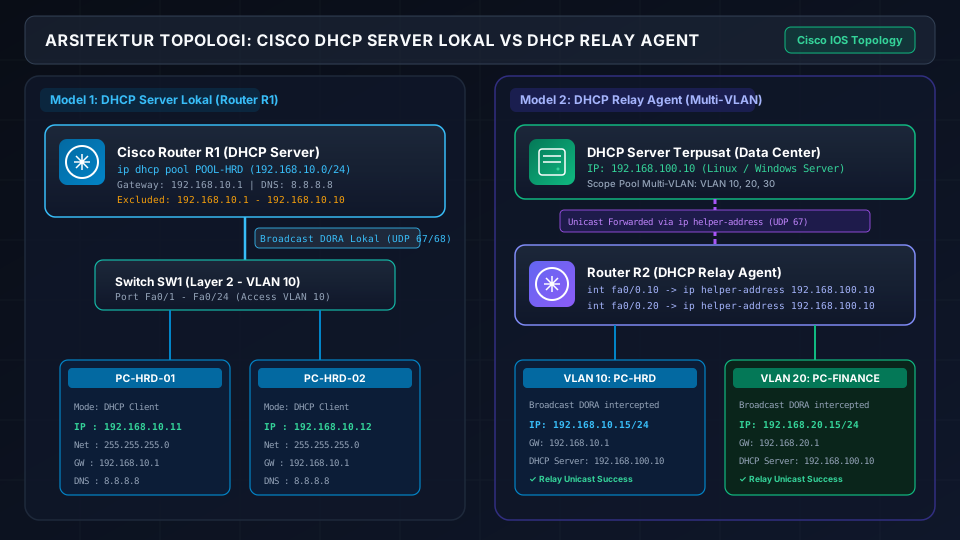
Tabel Perbandingan: DHCP Server Lokal vs DHCP Relay Agent
| Karakteristik | DHCP Server Lokal (Router) | DHCP Relay Agent (Terpusat) |
|---|---|---|
| Lokasi Layanan | Berjalan langsung di Cisco Router cabang | Server terpusat di Data Center (Windows / Linux) |
| Konsumsi Resource Router | Memakai CPU & RAM router untuk tabel binding | Sangat minim (router hanya meneruskan paket UDP) |
| Manajemen Multi-Subnet | Dikelola per-router di setiap cabang secara terpisah | Satu konsol terpusat untuk seluruh subnet/VLAN |
| Ketergantungan Link WAN | Mandiri (klien tetap dapat IP jika link WAN putus) | Bergantung pada koneksi WAN/VPN ke Data Center |
| Skenario Terbaik | Kantor cabang kecil (SOHO), lab mandiri, standalone LAN | Perusahaan skala menengah-besar, kampus, multi-site |
Memahami Proses DORA pada Protokol DHCP
Sebelum mengeksekusi baris perintah konfigurasi, sangat penting bagi network engineer untuk memahami alur 4 tahap negosiasi antara klien dan DHCP Server yang dikenal dengan akronim DORA (beroperasi pada protokol UDP port 67 untuk Server dan port 68 untuk Klien):
Klien baru yang belum memiliki IP mengirimkan frame broadcast ke alamat 255.255.255.255 dengan source IP 0.0.0.0 untuk mencari apakah ada DHCP Server aktif di subnet lokal.
DHCP Server yang menerima Discover akan merespons dengan menawarkan sebuah IP address yang masih tersedia beserta subnet mask, default gateway, DNS server, dan durasi sewa (lease time).
Klien menyetujui salah satu tawaran IP dan mengirimkan paket broadcast yang memberitahukan ke seluruh jaringan bahwa ia memilih tawaran dari DHCP Server tertentu (menolak tawaran lain jika ada lebih dari 1 server).
DHCP Server mengirim paket konfirmasi final (ACK), mencatat MAC address klien ke database binding, dan klien resmi dapat menggunakan IP address tersebut untuk berkomunikasi.
Selalu tentukan rentang IP yang dikecualikan (misal IP Router Gateway .1, Server .2-.10, Printer Jaringan .11-.20) sebelum membuat pool DHCP. Jika pool dibuat terlebih dahulu saat klien sudah terhubung, router bisa mendistribusikan IP gateway kepada klien, menyebabkan konflik IP instan.
1. Konfigurasi DHCP Server Cisco untuk LAN / VLAN 10 (HRD)
Berikut adalah urutan perintah standar industri untuk membangun DHCP Server pada router Cisco (misal Router R1 untuk divisi HRD pada network 192.168.10.0/24):
R1> enable
R1# configure terminal

! LANGKAH 1: Kecualikan IP statis (Gateway router & server internal)
R1(config)# ip dhcp excluded-address 192.168.10.1 192.168.10.10

! LANGKAH 2: Buat DHCP Pool bernama POOL-HRD
R1(config)# ip dhcp pool POOL-HRD

! LANGKAH 3: Definisikan subnet network dan subnet mask
R1(dhcp-config)# network 192.168.10.0 255.255.255.0

! LANGKAH 4: Tetapkan Default Gateway (IP subinterface / interface router)
R1(dhcp-config)# default-router 192.168.10.1

! LANGKAH 5: Tentukan DNS Server primer dan sekunder
R1(dhcp-config)# dns-server 8.8.8.8 1.1.1.1

! LANGKAH 6: Tentukan domain name lokal dan masa sewa IP (opsional)
R1(dhcp-config)# domain-name infokoding.lan
R1(dhcp-config)# lease 7 0 0
! Keterangan lease: [hari] [jam] [menit] -> 7 hari masa sewa

R1(dhcp-config)# exit
R1(config)# exit
R1# write memory
2. Konfigurasi Pool DHCP untuk Multi-VLAN (VLAN 20 & VLAN 30)
Jika router bertindak sebagai router Router-on-a-Stick atau terhubung ke Switch Layer 3, Anda dapat membuat beberapa DHCP pool sekaligus di router yang sama. Cisco IOS secara otomatis mencocokkan IP sub-interface penerima paket Discover dengan network pool yang sesuai:
! Pool untuk VLAN 20 (Divisi Keuangan / Finance)
R1(config)# ip dhcp excluded-address 192.168.20.1 192.168.20.10
R1(config)# ip dhcp pool POOL-KEUANGAN
R1(dhcp-config)# network 192.168.20.0 255.255.255.0
R1(dhcp-config)# default-router 192.168.20.1
R1(dhcp-config)# dns-server 8.8.8.8 1.1.1.1
R1(dhcp-config)# lease 3
R1(dhcp-config)# exit

! Pool untuk VLAN 30 (Divisi IT & Server Farm)
R1(config)# ip dhcp excluded-address 192.168.30.1 192.168.30.20
R1(config)# ip dhcp pool POOL-IT
R1(dhcp-config)# network 192.168.30.0 255.255.255.0
R1(dhcp-config)# default-router 192.168.30.1
R1(dhcp-config)# dns-server 8.8.8.8 8.8.4.4
R1(dhcp-config)# exit
3. Konfigurasi DHCP Relay Agent dengan IP Helper Address
Secara default, perangkat router memblokir paket broadcast (termasuk DHCP Discover). Jika DHCP Server perusahaan berada di lokasi terpusat (misal Server Farm di 192.168.100.10) dan klien berada di cabang/router lain, klien tidak akan pernah menerima IP address.
Solusinya adalah mengonfigurasi router lokal sebagai DHCP Relay Agent menggunakan perintah ip helper-address. Router akan mencegat paket broadcast DHCP dari klien dan mengubahnya menjadi paket Unicast yang diteruskan langsung ke IP DHCP Server terpusat:
! Masuk ke interface / sub-interface yang MENGHADAP KLIEN (bukan interface server)
R1(config)# interface fastethernet 0/0.10
R1(config-subif)# ip helper-address 192.168.100.10
R1(config-subif)# exit

R1(config)# interface fastethernet 0/0.20
R1(config-subif)# ip helper-address 192.168.100.10
R1(config-subif)# exit

! Jika menggunakan interface fisik biasa (Non-VLAN):
R1(config)# interface gigabitethernet 0/1
R1(config-if)# ip helper-address 192.168.100.10
R1(config-if)# exitPerintah ip helper-address pada Cisco IOS secara default tidak hanya meneruskan DHCP (Port 67/68), tetapi juga port UDP broadcast lainnya: TIME (37), TACACS (49), DNS (53), TFTP (69), dan NetBIOS (137/138).
Kurikulum CCNA: Transisi ke DHCPv6 (Stateless vs Stateful)
IPv6 Dynamic Addressing & Prefix Delegation
Berbeda dengan IPv4 yang mengandalkan broadcast DORA, pada arsitektur IPv6 seluruh komunikasi dilakukan via Multicast (alamat ff02::1:2 untuk All-DHCPv6-Relay-Agents-and-Servers). Cisco IOS mendukung 2 metode utama alokasi IPv6 dinamis:
Klien membuat alamat IPv6 sendiri via Router Advertisement (RA), sementara server hanya membagikan DNS & domain (ipv6 nd other-config-flag).
Mirip DHCP IPv4 tradisional di mana DHCPv6 Server mencatat dan mengalokasikan seluruh IP address & prefix ke klien (ipv6 nd managed-config-flag).
! Contoh Konfigurasi Cepat Stateless DHCPv6 di Cisco IOS:
R1(config)# ipv6 unicast-routing
R1(config)# ipv6 dhcp pool IPV6-STATELESS-POOL
R1(config-dhcpv6)# dns-server 2001:4860:4860::8888
R1(config-dhcpv6)# domain-name infokoding.lan
R1(config-dhcpv6)# exit
R1(config)# interface gigabitethernet 0/0
R1(config-if)# ipv6 dhcp server IPV6-STATELESS-POOL
R1(config-if)# ipv6 nd other-config-flag
4. Mitigasi Keamanan DHCP: Mencegah Rogue DHCP Server dengan DHCP Snooping
Salah satu kerentanan keamanan terbesar pada DHCP adalah serangan Rogue DHCP Server — di mana penyerang memasang server DHCP ilegal di jaringan lokal untuk membagikan Default Gateway dan DNS palsu (serangan Man-in-the-Middle / pembajakan trafik).
Cisco Switch menyediakan fitur keamanan Layer 2 bernama DHCP Snooping. Konsep dasarnya adalah membagi port switch menjadi dua kategori:
- Trusted Port: Port yang terhubung ke DHCP Server resmi atau uplink router. Hanya port ini yang diizinkan mengirim paket DHCP Offer dan DHCP Ack.
- Untrusted Port: Semua port akses yang terhubung ke PC klien. Jika ada paket DHCP Offer/Ack masuk dari port untrusted, switch otomatis memblokir paket tersebut.
! Konfigurasi DHCP Snooping pada Switch Cisco (SW1)
SW1> enable
SW1# configure terminal

! 1. Aktifkan DHCP Snooping secara global
SW1(config)# ip dhcp snooping

! 2. Aktifkan snooping pada VLAN yang ditargetkan
SW1(config)# ip dhcp snooping vlan 10,20,30

! 3. Atur port uplink ke router / server resmi sebagai TRUSTED
SW1(config)# interface fastethernet 0/24
SW1(config-if)# ip dhcp snooping trust
SW1(config-if)# exit

! 4. Batasi laju paket DHCP (Rate Limiting) pada port akses klien untuk mencegah Starvation Attack
SW1(config)# interface range fastethernet 0/1 - 20
SW1(config-if-range)# ip dhcp snooping limit rate 50
SW1(config-if-range)# exit

SW1# show ip dhcp snoopingDatabase yang dibuat oleh DHCP Snooping (DHCP Snooping Binding Table) juga menjadi fondasi penting bagi fitur keamanan Cisco lainnya seperti Dynamic ARP Inspection (DAI) untuk mencegah ARP Poisoning dan IP Source Guard (IPSG) untuk mencegah IP Spoofing. Pelajari juga konfigurasi penyaringan trafik pada modul Access Control List (ACL) Cisco.
5. Perintah Verifikasi & Monitoring DHCP Server
Gunakan serangkaian perintah diagnosa Privileged Exec Mode untuk memastikan layanan DHCP berjalan normal:
A. Melihat Daftar Alokasi IP Aktif (show ip dhcp binding)
R1# show ip dhcp binding
IP address       Client-ID/Hardware address   Lease expiration        Type
192.168.10.11    0100.5079.6668.01            Jul 28 2026 08:00 AM    Automatic
192.168.10.12    0100.e411.5542.ab            Jul 28 2026 08:15 AM    Automatic
192.168.20.11    0100.0234.beef.12            Jul 28 2026 08:30 AM    Automatic
Prefiks 01 pada Client-ID menandakan tipe hardware Ethernet, diikuti oleh MAC Address perangkat klien.
B. Memeriksa Statistik Transaksi Paket (show ip dhcp server statistics)
R1# show ip dhcp server statistics
Memory usage         : 24576
Address pools        : 3
Database agents      : 0
Automatic bindings   : 3
Expired bindings     : 0
Malformed messages   : 0

Message              Received
BOOTREQUEST          3
DHCPDISCOVER         3
DHCPREQUEST          3
DHCPDECLINE          0
DHCPRELEASE          0
DHCPINFORM           0

Message              Sent
BOOTREPLY            3
DHCPOFFER            3
DHCPACK              3
DHCPNAK              0
C. Mereset / Menghapus Tabel Binding (clear ip dhcp binding)
! Menghapus binding satu IP tertentu
R1# clear ip dhcp binding 192.168.10.11

! Menghapus seluruh riwayat binding di router
R1# clear ip dhcp binding *
6. Langkah Troubleshooting DHCP Cisco (Conflict & Debugging)
Ketika klien gagal memperoleh IP address atau muncul peringatan IP Conflict di sistem operasi, lakukan langkah investigasi berikut:
A. Mendeteksi dan Mengatasi Konflik IP (show ip dhcp conflict)
Sebelum Cisco Router membagikan IP address dari pool, router secara otomatis mengirimkan 2 paket ICMP Echo Request (Ping) ke alamat tersebut. Jika ada perangkat yang merespons (artinya IP sudah dipakai secara statis tanpa sepengetahuan DHCP), router menandai IP tersebut sebagai Conflict dan menyimpannya ke conflict table agar tidak dibagikan:
R1# show ip dhcp conflict
IP address        Detection method   Detection time          VRF
192.168.10.15     Ping               Aug 21 2026 10:15 AM    --

! Setelah perangkat statis dipindahkan IP-nya, hapus conflict table:
R1# clear ip dhcp conflict *
B. Melacak Pertukaran Paket Real-time via Debugging
Untuk melihat secara langsung proses DORA saat klien meminta IP di Cisco Packet Tracer atau router fisik, aktifkan fitur debugging DHCP:
! Mengaktifkan pelacakan event alokasi DHCP
R1# debug ip dhcp server events
DHCP server event debugging is on

! Mengaktifkan pelacakan transmisi paket DORA
R1# debug ip dhcp server packet
DHCP server packet debugging is on

! OUTPUT LOG:
*Aug 21 11:20:01.120: DHCPD: DHCPDISCOVER received from client 0100.5079.6668.01 on interface FastEthernet0/0.10.
*Aug 21 11:20:01.122: DHCPD: sending DHCPOFFER to client 0100.5079.6668.01 (192.168.10.11).
*Aug 21 11:20:01.145: DHCPD: DHCPREQUEST received from client 0100.5079.6668.01.
*Aug 21 11:20:01.148: DHCPD: sending DHCPACK to client 0100.5079.6668.01 (192.168.10.11).

! SANGAT PENTING: Matikan debugging setelah selesai analisis!
R1# undebug all
! Atau:
R1# no debug allPerintah debug memproses log langsung di CPU router. Pada lingkungan produksi dengan ribuan klien, membiarkan debug aktif dapat memicu lonjakan CPU 100% (High CPU Utilization) hingga router tidak responsif. Selalu jalankan undebug all segera setelah analisis selesai.
C. Checklist 5 Penyebab Utama Klien Gagal Mendapatkan IP DHCP
Layanan DHCP Server Ternonaktifkan (Disabled)
Pada beberapa image IOS, service DHCP mungkin dalam status mati. Pastikan layanan aktif dengan mengeksekusi perintah global: service dhcp.
Subnet Network Pool Tidak Cocok dengan Interface Router
Jika interface router memiliki IP 192.168.10.1/24 namun perintah network di DHCP pool ditulis 192.168.20.0 255.255.255.0, router tidak akan membagikan IP ke klien di interface tersebut.
IP Helper-Address Dipasang di Interface yang Salah
Perintah ip helper-address wajib dipasang pada interface router lokal yang menerima broadcast dari klien, bukan pada interface yang mengarah ke server.
Kapasitas Pool IP Habis (Exhausted Address Pool)
Jika jumlah klien melebihi kapasitas subnet (misal /28 hanya 14 host), klien baru akan gagal meminta IP (mengalami APIPA 169.254.x.x). Periksa utilisasi pool dengan show ip dhcp pool.
Port Switch Menghubungkan Klien Berada di VLAN yang Salah
Pastikan port access switch tempat PC tercolok telah dialokasikan ke VLAN ID yang benar sesuai subnet gateway yang diinginkan.
FAQ: Pertanyaan Umum Seputar DHCP Server Cisco
Apa fungsi perintah 'ip dhcp excluded-address' pada Cisco Router?
Perintah ini digunakan untuk mengecualikan rentang IP address tertentu agar tidak dibagikan secara dinamis kepada klien DHCP. IP yang dikecualikan biasanya dialokasikan secara statis untuk Default Gateway Router, Server, Network Printer, atau Access Point.
Kapan kita wajib menggunakan DHCP Relay Agent (ip helper-address)?
DHCP Relay Agent wajib digunakan ketika DHCP Server berada di network subnet atau segmen jaringan yang berbeda dari klien. Karena router tidak meneruskan paket broadcast (DHCP Discover), ip helper-address bertugas mengubah broadcast tersebut menjadi paket Unicast dan meneruskannya langsung ke IP DHCP Server terpusat.
Bagaimana cara Cisco Router mendeteksi adanya konflik IP (IP Conflict)?
Sebelum membagikan IP address ke klien, Cisco IOS Router akan mengirimkan 2 paket ICMP Echo Request (Ping) ke alamat tersebut. Jika ada perangkat yang merespons ping, router otomatis menganggap IP tersebut sudah terpakai, menandainya sebagai Conflict di tabel conflict, dan memilih IP lain yang aman untuk klien.
Dengan menguasai konfigurasi DHCP Server, pemahaman DORA, implementasi DHCP Relay Agent, serta proteksi DHCP Snooping, pengelolaan distribusi IP jaringan Anda kini berjalan otomatis, cepat, dan aman dari ancaman rogue server. Pada bab berikutnya, kita akan mempelajari mekanisme pengamanan trafik menggunakan Access Control List (ACL) pada Cisco Router!