Belajar membuat aplikasi catatan (notes app) lengkap dengan JavaScript Vanilla tanpa library atau framework. Dilengkapi diagram alur CRUD, API Cheatsheet, live interactive demo, dan localStorage.
Terakhir diperbarui:
Bisakah Membuat Aplikasi Catatan dengan JavaScript Tanpa Framework?
Direct Answer:Ya, sepenuhnya bisa. Dengan JavaScript Vanilla (tanpa React, Vue, atau Angular), Anda dapat membangun aplikasi catatan berfitur penuh — termasuk operasi CRUD (Create, Read, Update, Delete), penyimpanan data persisten vialocalStorage, pencarian real-time, filter kategori, mode gelap, hingga ekspor catatan ke format.txt— hanya dengan HTML, CSS, dan JavaScript murni.
Tutorial ini dirancang untuk pemula hingga menengah dan cocok dijadikan portofolio JavaScript yang mengesankan.
Mulai Eksplorasi & Uji Coba Proyek
Uji coba aplikasi interaktif secara langsung atau download source code lengkapnya.
⚡ Ringkasan Fungsi Utama (JavaScript API Cheatsheet)
Tabel referensi cepat fungsi dan method inti JavaScript murni yang digunakan sepanjang tutorial ini:
| Method / Properti | Kategori | Deskripsi Singkat | Contoh Implementasi |
|---|---|---|---|
| localStorage.setItem() | Web Storage | Menyimpan string data ke penyimpanan browser klien | localStorage.setItem("notes", JSON.stringify(notes)) |
| localStorage.getItem() | Web Storage | Mengambil data tersimpan berdasarkan nama key | const raw = localStorage.getItem("notes") |
| JSON.stringify() | JSON Serializer | Mengonversi objek atau array JS menjadi string JSON | const str = JSON.stringify(data) |
| JSON.parse() | JSON Parser | Mengonversi string JSON kembali ke objek/array JS | const arr = JSON.parse(str) || [] |
| Array.prototype.unshift() | State Mutation | Menyisipkan elemen baru di urutan paling awal | notes.unshift(newNote) |
| Array.prototype.filter() | Array Query | Menyaring catatan sesuai kata kunci / menghapus ID | notes.filter(n => n.id !== targetId) |
| Array.prototype.find() | Array Query | Mencari satu catatan spesifik berdasarkan ID | notes.find(n => n.id === targetId) |
| Element.innerHTML | DOM Sync | Menyuntikkan HTML hasil template literal secara massal | container.innerHTML = htmlString |
| escapeHtml() | Web Security | Sanitasi karakter rentan untuk mencegah injeksi XSS | escapeHtml(userInput) |
🎮 Live Demo Interaktif di Dalam Artikel
Anda dapat langsung mencoba fitur tambah, cari, filter kategori, edit, dan hapus catatan pada widget interaktif di bawah ini:
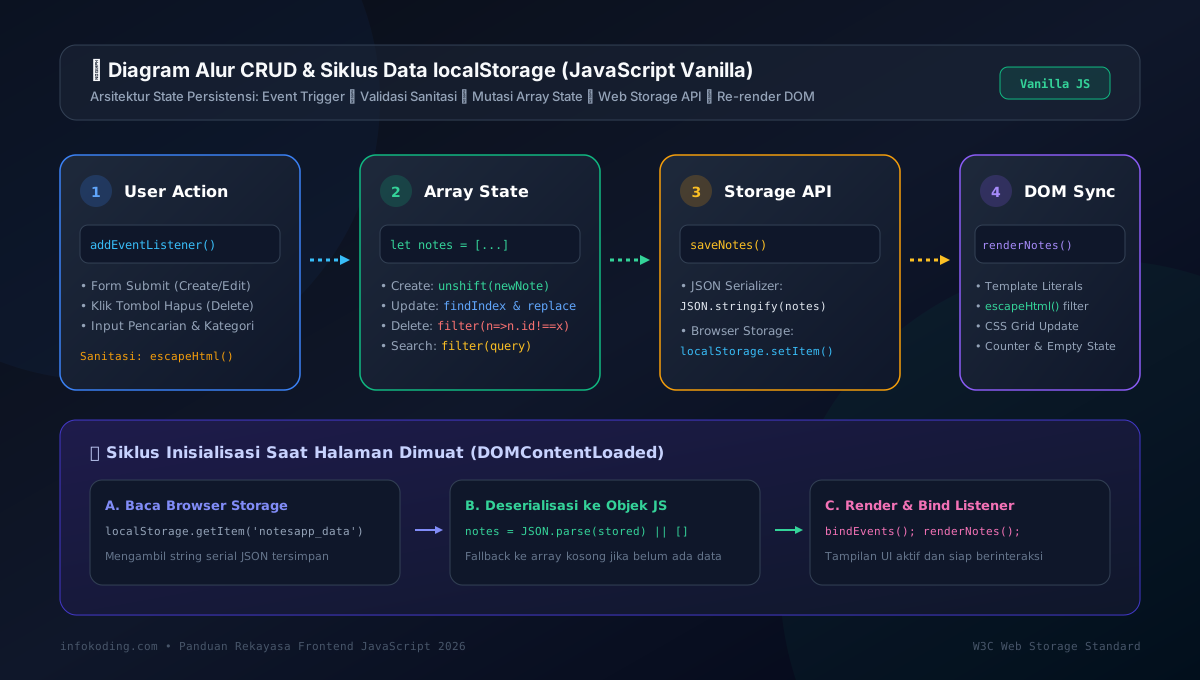
📊 Diagram Alur CRUD dan Siklus Data localStorage
Memahami bagaimana data bergerak di antara antarmuka pengguna, memori JavaScript, dan browser storage:
🗒️ Fitur Aplikasi Catatan yang Akan Dibangun
Berikut daftar fitur lengkap yang ada di aplikasi:
📁 Struktur Folder Proyek
Buat folder baru bernama notes-app/ dengan 3 file utama:
1. Membuat File HTML (index.html)
File index.html sebagai struktur antarmuka yang bersih dan semantik:
<!DOCTYPE html>
<html lang="id" data-theme="light">
<head>
  <meta charset="UTF-8">
  <meta name="viewport" content="width=device-width, initial-scale=1.0">
  <title>📒 Aplikasi Catatan – JavaScript Tanpa Framework</title>
  <link rel="stylesheet" href="style.css">
</head>
<body>
  <div class="app-wrapper">
    <header class="app-header">
      <h1>📒 NotesApp</h1>
      <button id="btn-toggle-theme" title="Toggle Dark Mode">🌙</button>
    </header>
    <div class="toolbar">
      <input type="text" id="input-search" placeholder="🔍 Cari catatan..." autocomplete="off">
      <select id="select-filter">
        <option value="all">Semua Kategori</option>
        <option value="Pribadi">Pribadi</option>
        <option value="Kerja">Kerja</option>
        <option value="Belajar">Belajar</option>
        <option value="Ide">Ide</option>
      </select>
      <button id="btn-add-note">+ Catatan Baru</button>
    </div>
    <p class="note-count" id="note-count">0 catatan</p>
    <div id="modal-overlay" class="modal-overlay hidden">
      <div class="modal">
        <h2 id="modal-title">Catatan Baru</h2>
        <input type="text" id="note-title" placeholder="Judul catatan..." maxlength="100">
        <select id="note-category">
          <option value="Pribadi">Pribadi</option>
          <option value="Kerja">Kerja</option>
          <option value="Belajar">Belajar</option>
          <option value="Ide">Ide</option>
        </select>
        <textarea id="note-content" rows="6" placeholder="Tulis catatan Anda di sini..."></textarea>
        <div class="modal-actions">
          <button id="btn-save-note">💾 Simpan</button>
          <button id="btn-cancel-modal" class="btn-secondary">Batal</button>
        </div>
      </div>
    </div>
    <div id="notes-container" class="notes-grid"></div>
    <div id="empty-state" class="empty-state hidden">
      <p>📭 Belum ada catatan. Klik "+ Catatan Baru" untuk mulai!</p>
    </div>
  </div>
  <script src="app.js"></script>
</body>
</html>
2. Membuat File CSS (style.css)
CSS terstruktur dengan CSS Custom Properties untuk tema gelap/terang instan:
*, *::before, *::after { box-sizing: border-box; margin: 0; padding: 0; }
:root {
  --bg: #f0f4f8; --surface: #ffffff; --surface-hover: #f8fafc;
  --border: #e2e8f0; --text-primary: #1e293b; --text-secondary: #64748b;
  --accent: #3b82f6; --accent-hover: #2563eb; --danger: #ef4444; --success: #10b981;
  --shadow: 0 2px 8px rgba(0,0,0,0.08); --shadow-lg: 0 8px 24px rgba(0,0,0,0.12); --radius: 12px;
}
[data-theme="dark"] {
  --bg: #0f172a; --surface: #1e293b; --surface-hover: #273548;
  --border: #334155; --text-primary: #f1f5f9; --text-secondary: #94a3b8;
  --shadow: 0 2px 8px rgba(0,0,0,0.4); --shadow-lg: 0 8px 24px rgba(0,0,0,0.5);
}
body { background: var(--bg); color: var(--text-primary); font-family: "Segoe UI", system-ui, -apple-system, sans-serif; font-size: 15px; line-height: 1.6; min-height: 100vh; transition: background 0.3s, color 0.3s; }
.app-wrapper { max-width: 900px; margin: 0 auto; padding: 1.5rem; }
.app-header { display: flex; align-items: center; justify-content: space-between; margin-bottom: 1.5rem; }
.app-header h1 { font-size: 1.5rem; font-weight: 800; }
#btn-toggle-theme { background: var(--surface); border: 1px solid var(--border); border-radius: 8px; padding: 0.4rem 0.8rem; cursor: pointer; font-size: 1.1rem; }
.toolbar { display: flex; gap: 0.75rem; flex-wrap: wrap; margin-bottom: 0.75rem; }
.toolbar input, .toolbar select { flex: 1; min-width: 160px; padding: 0.6rem 0.9rem; border: 1px solid var(--border); border-radius: 8px; background: var(--surface); color: var(--text-primary); font-size: 0.875rem; outline: none; }
#btn-add-note { padding: 0.6rem 1.2rem; background: var(--accent); color: #fff; border: none; border-radius: 8px; font-weight: 600; cursor: pointer; font-size: 0.875rem; }
.note-count { font-size: 0.8rem; color: var(--text-secondary); margin-bottom: 1rem; }
.notes-grid { display: grid; grid-template-columns: repeat(auto-fill, minmax(260px, 1fr)); gap: 1rem; }
.note-card { background: var(--surface); border: 1px solid var(--border); border-radius: var(--radius); padding: 1rem 1.1rem; box-shadow: var(--shadow); display: flex; flex-direction: column; gap: 0.5rem; }
.note-card h3 { font-size: 0.95rem; font-weight: 700; color: var(--text-primary); word-break: break-word; }
.note-card .note-body { font-size: 0.82rem; color: var(--text-secondary); line-height: 1.55; max-height: 80px; overflow: hidden; display: -webkit-box; -webkit-line-clamp: 4; -webkit-box-orient: vertical; }
.note-card .note-footer { display: flex; align-items: center; justify-content: space-between; margin-top: auto; padding-top: 0.5rem; border-top: 1px solid var(--border); }
.note-card .note-badge { font-size: 0.65rem; font-weight: 700; padding: 0.2rem 0.6rem; border-radius: 999px; background: rgba(59,130,246,0.15); color: var(--accent); }
.note-card .note-actions { display: flex; gap: 0.4rem; }
.note-card .note-actions button { padding: 0.3rem 0.6rem; font-size: 0.75rem; border: 1px solid var(--border); border-radius: 6px; background: var(--surface-hover); cursor: pointer; }
.modal-overlay { position: fixed; inset: 0; background: rgba(0,0,0,0.55); backdrop-filter: blur(4px); display: flex; align-items: center; justify-content: center; z-index: 100; padding: 1rem; }
.modal-overlay.hidden { display: none; }
.modal { background: var(--surface); border: 1px solid var(--border); border-radius: 16px; padding: 1.75rem; width: 100%; max-width: 480px; display: flex; flex-direction: column; gap: 0.9rem; }
.modal input, .modal select, .modal textarea { width: 100%; padding: 0.65rem 0.9rem; border: 1px solid var(--border); border-radius: 8px; background: var(--bg); color: var(--text-primary); font-size: 0.9rem; outline: none; }
.modal-actions { display: flex; gap: 0.75rem; justify-content: flex-end; }
#btn-save-note { padding: 0.6rem 1.4rem; background: var(--accent); color: #fff; border: none; border-radius: 8px; font-weight: 700; cursor: pointer; }
.btn-secondary { padding: 0.6rem 1.2rem; background: var(--surface-hover); color: var(--text-secondary); border: 1px solid var(--border); border-radius: 8px; cursor: pointer; }
.empty-state { text-align: center; padding: 4rem 1rem; color: var(--text-secondary); }
.empty-state.hidden { display: none; }
3. Membuat File JavaScript (app.js)
Logika lengkap CRUD, localStorage, filter, pencarian, dan proteksi XSS:
// State & Variabel Global
let notes = [];
let editingId = null;
// Inisialisasi Aplikasi
document.addEventListener('DOMContentLoaded', () => {
loadNotes(); loadTheme(); bindEvents(); renderNotes();
});
// Operasi LocalStorage
function loadNotes() {
const stored = localStorage.getItem('notesapp_data');
notes = stored ? JSON.parse(stored) : [];
}
function saveNotes() {
localStorage.setItem('notesapp_data', JSON.stringify(notes));
}
// Tema Gelap/Terang
function loadTheme() {
const saved = localStorage.getItem('notesapp_theme') || 'light';
document.documentElement.setAttribute('data-theme', saved);
document.getElementById('btn-toggle-theme').textContent = saved === 'dark' ? '☀️' : '🌙';
}
function toggleTheme() {
const html = document.documentElement;
const next = html.getAttribute('data-theme') === 'dark' ? 'light' : 'dark';
html.setAttribute('data-theme', next);
localStorage.setItem('notesapp_theme', next);
document.getElementById('btn-toggle-theme').textContent = next === 'dark' ? '☀️' : '🌙';
}
// Event Listeners
function bindEvents() {
document.getElementById('btn-toggle-theme').addEventListener('click', toggleTheme);
document.getElementById('btn-add-note').addEventListener('click', openModalAdd);
document.getElementById('btn-save-note').addEventListener('click', saveNote);
document.getElementById('btn-cancel-modal').addEventListener('click', closeModal);
document.getElementById('input-search').addEventListener('input', renderNotes);
document.getElementById('select-filter').addEventListener('change', renderNotes);
document.getElementById('modal-overlay').addEventListener('click', (e) => {
if (e.target.id === 'modal-overlay') closeModal();
});
document.addEventListener('keydown', (e) => {
if (e.key === 'Escape') closeModal();
if ((e.ctrlKey || e.metaKey) && e.key === 'n') { e.preventDefault(); openModalAdd(); }
});
}
// Modal Control
function openModalAdd() {
editingId = null;
document.getElementById('modal-title').textContent = 'Catatan Baru';
document.getElementById('note-title').value = '';
document.getElementById('note-content').value = '';
document.getElementById('note-category').value = 'Pribadi';
document.getElementById('modal-overlay').classList.remove('hidden');
document.getElementById('note-title').focus();
}
function openModalEdit(id) {
const note = notes.find(n => n.id === id);
if (!note) return;
editingId = id;
document.getElementById('modal-title').textContent = 'Edit Catatan';
document.getElementById('note-title').value = note.title;
document.getElementById('note-content').value = note.content;
document.getElementById('note-category').value = note.category;
document.getElementById('modal-overlay').classList.remove('hidden');
document.getElementById('note-title').focus();
}
function closeModal() {
document.getElementById('modal-overlay').classList.add('hidden');
editingId = null;
}
// Simpan Catatan (Create & Update)
function saveNote() {
const title = document.getElementById('note-title').value.trim();
const content = document.getElementById('note-content').value.trim();
const category = document.getElementById('note-category').value;
if (!title || !content) { alert('⚠️ Judul dan isi catatan wajib diisi!'); return; }
if (editingId !== null) {
const idx = notes.findIndex(n => n.id === editingId);
if (idx > -1) notes[idx] = { ...notes[idx], title, content, category, updatedAt: new Date().toISOString() };
} else {
notes.unshift({ id: Date.now(), title, content, category, createdAt: new Date().toISOString(), updatedAt: new Date().toISOString() });
}
saveNotes(); closeModal(); renderNotes();
}
// Hapus Catatan (Delete)
function deleteNote(id) {
if (!confirm('🗑️ Hapus catatan ini secara permanen?')) return;
notes = notes.filter(n => n.id !== id);
saveNotes(); renderNotes();
}
// Ekspor ke .TXT
function exportNote(id) {
const note = notes.find(n => n.id === id);
if (!note) return;
const text = `📒 ${note.title}\nKategori: ${note.category}\n---\n${note.content}`;
const blob = new Blob([text], { type: 'text/plain;charset=utf-8' });
const a = document.createElement('a');
a.href = URL.createObjectURL(blob);
a.download = `${note.title.toLowerCase().replace(/\s+/g, '-')}.txt`;
a.click();
URL.revokeObjectURL(a.href);
}
// Render Data ke DOM
function renderNotes() {
const query = document.getElementById('input-search').value.toLowerCase().trim();
const category = document.getElementById('select-filter').value;
const container = document.getElementById('notes-container');
const empty = document.getElementById('empty-state');
const filtered = notes.filter(n => {
const matchSearch = !query || n.title.toLowerCase().includes(query) || n.content.toLowerCase().includes(query);
const matchCat = category === 'all' || n.category === category;
return matchSearch && matchCat;
});
document.getElementById('note-count').textContent = `${filtered.length} catatan`;
if (filtered.length === 0) { container.innerHTML = ''; empty.classList.remove('hidden'); return; }
empty.classList.add('hidden');
container.innerHTML = filtered.map(n => `
<article class="note-card" data-id="${n.id}">
<h3>${escapeHtml(n.title)}</h3>
<p class="note-body">${escapeHtml(n.content)}</p>
<div class="note-footer">
<span class="note-badge">${escapeHtml(n.category)}</span>
<div class="note-actions">
<button onclick="openModalEdit(${n.id})" title="Edit">✏️</button>
<button onclick="exportNote(${n.id})" title="Export">📥</button>
<button onclick="deleteNote(${n.id})" title="Hapus">🗑️</button>
</div>
</div>
</article>
`).join('');
}
// Keamanan: XSS Sanitization
function escapeHtml(str) {
return String(str).replace(/&/g, '&').replace(/</g, '<').replace(/>/g, '>').replace(/"/g, '"').replace(/'/g, ''');
}✅ Kesimpulan
Anda telah berhasil membangun aplikasi catatan JavaScript berfitur lengkap tanpa menggunakan satu pun framework atau library eksternal. Proyek ini membuktikan bahwa:
- JavaScript Vanilla lebih dari cukup untuk aplikasi web fungsional dan modern
localStorageadalah solusi penyimpanan client-side yang mudah dan efektif- Pemahaman mendalam tentang DOM, event, dan array methods adalah fondasi kuat sebelum belajar framework
- Keamanan (escapeHtml) harus selalu menjadi prioritas bahkan di proyek kecil sekalipun
FAQ: Pertanyaan Umum
Apakah data catatan hilang jika browser ditutup?
Tidak. Aplikasi menggunakan localStorage yang bersifat persisten — data tetap tersimpan meski browser ditutup atau komputer dimatikan. Data hanya hilang jika Anda menghapus data browsing atau menghapus catatan secara manual.
Bisakah aplikasi ini dipakai di perangkat mobile?
Bisa! CSS menggunakan Flexbox dan Grid dengan breakpoint responsif. Tampilan otomatis menyesuaikan layar smartphone maupun tablet.
Apakah perlu koneksi internet untuk menjalankan aplikasi ini?
Tidak perlu sama sekali. Aplikasi ini berjalan 100% di browser (client-side) tanpa memerlukan server atau koneksi internet. Semua proses terjadi secara lokal di perangkat Anda.
Bagaimana cara menyimpan catatan secara online/cloud?
Untuk penyimpanan cloud, Anda perlu backend (API). Bisa menggunakan Firebase Realtime Database (gratis untuk proyek kecil) atau membuat REST API sendiri dengan Node.js/PHP dan mengganti fungsi localStorage dengan fetch() ke API tersebut.

Rusmawan Abdullah Sani
DevOps Engineer & Lead Developer at infokodingPraktisi pengembangan web, DevOps, dan keamanan jaringan server Linux dengan pengalaman mengelola infrastruktur cloud server berskala produksi. Berfokus membagikan panduan teknis mendalam tentang administrasi server, otomasi deployment, dan tutorial programming di infokoding.com.